Ren'Py Image Optimizer & Renamer: Convert, Resize & Organize in One Click
A downloadable tool
Short Description
A lightweight utility tool designed for Visual Novel developers. Easily convert 4K renders to WebP, resize, and apply sequential renaming directly into your game folder.
Description
I created this tool to streamline the development workflow for my own game, The Asmodeus Eyes. As many of you know, working with high-quality 3D renders (2K/4K PNGs) can result in massive file sizes that bloat your game.
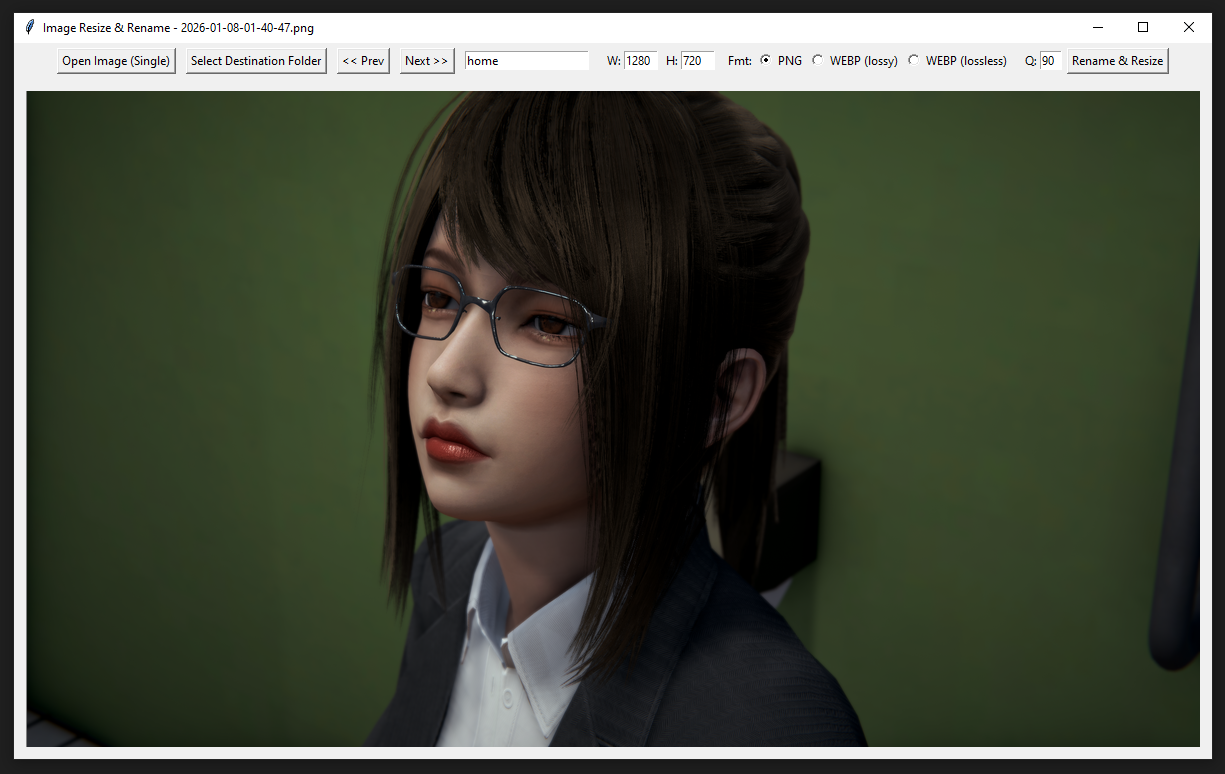
This tool solves that problem. It allows you to preview your renders, resize them, convert them to efficient formats (like WebP), and rename them with sequential numbering—all in one smooth process.
Why use this tool?
- Drastic Size Reduction: Convert a 4MB PNG into a high-quality 100-200KB WebP file instantly.
- Ren'Py Ready: It handles the tedious naming convention for you. Just set a prefix (e.g.,
LuxElly), and the tool automatically saves files asLuxElly_1,LuxElly_2, etc. - Workflow Efficiency: No need to open Photoshop for every single image. Just browse, click, and it's done.
⚙️ How It Works (Step-by-Step)
- Select Source: Open the folder containing your raw rendered images.
- Select Destination: Choose where you want the processed files to go (e.g., your Ren'Py
game/imagesfolder). - Set Prefix: Type the base name for your images (e.g.,
Event_Beach). - Configure: Set your desired resolution (Width/Height) and Format (PNG or WebP).
- Browse & Execute:
- Use < Prev / Next > to preview images.
- When you find the one you want, click "Rename & Resize".
- The tool will process that image, name it
Event_Beach_1, and save it to your destination. - Click Next, then Rename & Resize again—the next file will automatically be named
Event_Beach_2.
Download
Click download now to get access to the following files:
Comments
Log in with itch.io to leave a comment.
I really want to play! I'll wait.